

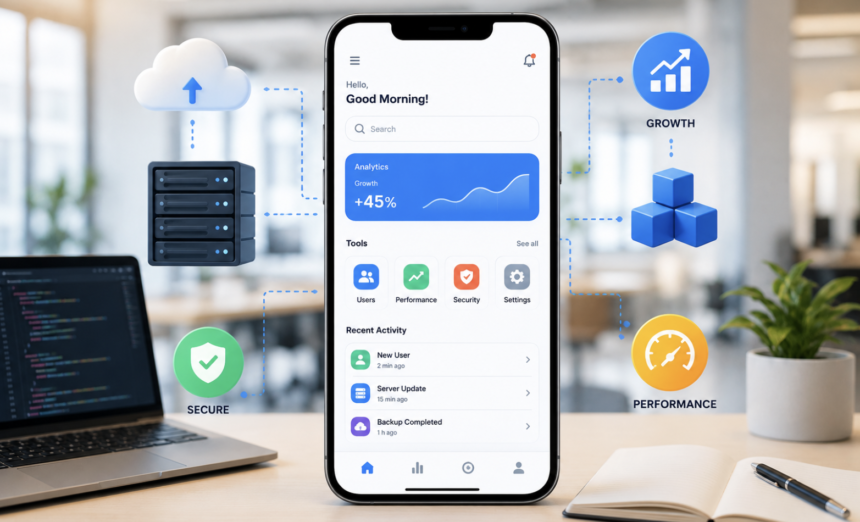
Your mobile app may start with a handful of customers, but success can change everything overnight. A viral campaign can send thousands of users to your app within hours. New markets can multiply transactions, data, and support requests within months. Without the right foundation, that growth can quickly expose hidden technical weaknesses. A scalable mobile application prepares for growth before growth becomes a problem. It keeps performance stable while users, transactions, features, and integrations continue increasing. More importantly, it helps businesses expand without rebuilding their entire technology stack.
However, scalability involves more than adding powerful servers. It requires thoughtful architecture, efficient code, resilient infrastructure, smart databases, strong security, and continuous testing. Therefore, businesses must treat scalability as a core product strategy rather than a future repair project.
This guide explains how to build a mobile application that can grow confidently. It also explores advanced strategies that can improve reliability, cost efficiency, and long-term performance.
What Makes a Mobile Application Truly Scalable?
A scalable mobile application handles increasing demand without unacceptable performance degradation. It should support more users without causing crashes, excessive delays, or service interruptions. However, scalability has several dimensions beyond user numbers. Your application may also experience growing databases, higher transaction volumes, larger media files, and additional integrations.
Geographical expansion introduces another challenge. Users in different regions may have different network conditions, devices, languages, and expectations.
Consequently, scalability should cover performance, infrastructure, architecture, data, security, and user experience. A strong solution balances all these areas instead of focusing on one technical component.
Why Scalability Should Begin Before Development
Waiting until your application becomes successful can make scalability much harder. Early architectural decisions often influence how easily the product can evolve later. For instance, tightly connected components can make simple changes surprisingly risky. Likewise, inefficient database queries can become expensive when millions of records accumulate.
However, preparing for growth does not mean building an enormous system immediately. Instead, teams should create a flexible foundation that matches realistic business expectations.
A small startup does not necessarily need dozens of microservices on its first day. A modular architecture can provide flexibility while keeping development manageable. The goal is simple. Build today’s product while leaving sensible paths toward tomorrow’s requirements.
Define Growth Targets Before Choosing Technology
Technology decisions should follow business expectations rather than popularity. Start by estimating expected users, transactions, locations, and feature growth. Then identify the parts of your application likely to experience the highest demand. Consider peak usage as well as average usage. An application might normally serve 10,000 users but suddenly receive 100,000 visitors during promotions.
Also consider future integrations, subscription plans, payment systems, analytics, and communication channels. These requirements can significantly affect architectural decisions.
Furthermore, define acceptable performance targets before development begins. For example, determine expected API response times and acceptable error rates. Clear targets give developers measurable goals instead of vague expectations.
Create a Flexible Mobile App Architecture
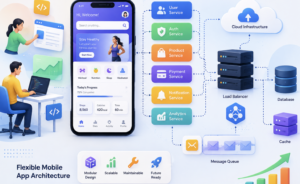
Architecture provides the structural foundation for scalability. A well-designed system separates responsibilities between different application components. This separation makes individual areas easier to test, maintain, upgrade, and scale. A modular monolith can work extremely well for many growing businesses. It keeps deployment relatively simple while creating boundaries between important functions. As demand increases, specific components can later become independently scalable services.
This approach avoids unnecessary complexity during the early stages. Microservices can provide advantages for large systems, but they also introduce operational overhead. Therefore, businesses should adopt them when actual requirements justify their complexity.
Good architecture also supports loose coupling between components. When one component changes, unrelated features should continue working normally.
Select a Technology Stack for Long-Term Stability
The newest technology is not automatically the best technology. Businesses should evaluate performance, developer availability, ecosystem maturity, security, maintenance, and integration support. They should also consider how easily future developers can understand the codebase. For mobile development, teams can choose native or cross-platform technologies. The decision should depend on product requirements, platform needs, performance expectations, and available resources.
Backend technologies deserve the same careful evaluation. A framework should support expected workloads without creating unnecessary development or infrastructure challenges.
Additionally, dependency management deserves attention. Outdated libraries can create security vulnerabilities and compatibility problems. Therefore, teams should establish a regular process for reviewing and updating dependencies.
Build APIs That Can Survive Growing Traffic
The API layer connects the mobile application with backend services. Its design can strongly influence application speed and reliability. Efficient APIs should return only the information clients actually need. Pagination can prevent large datasets from being transferred unnecessarily. Caching can reduce repeated backend operations.
Request throttling can prevent individual clients from overwhelming services. Asynchronous processing can also improve responsiveness. Long-running operations should not always block the user’s request.
API versioning becomes increasingly important as applications mature. Older mobile versions may remain installed while newer versions use updated endpoints. Therefore, APIs should evolve without unnecessarily breaking existing clients.
Build a Database That Can Handle More Data
Database growth can quietly become one of the biggest scalability challenges. A query that works perfectly with 10,000 records may perform poorly with millions. Therefore, developers should optimize database operations before traffic becomes overwhelming. Indexes can accelerate frequently used searches. However, excessive indexes can increase storage requirements and slow certain write operations.
Database design should therefore balance read and write performance. Teams should also monitor slow queries and investigate unusual database activity.
As datasets expand, businesses may consider replication, partitioning, archiving, or specialized storage. Caching can also reduce repeated database requests. Most importantly, database architecture should reflect actual access patterns.
Design for Horizontal Scaling
Horizontal scaling means adding additional application instances as demand increases. It often provides greater flexibility than continually upgrading one powerful server. Load balancers can distribute incoming traffic across multiple instances. This approach also improves resilience when one instance experiences problems.
Applications designed for horizontal scaling should avoid relying heavily on local server state. Shared storage and centralized session management can help maintain consistency.
Stateless application components can make scaling considerably easier. They allow new instances to handle requests without depending on previous requests. This strategy becomes particularly valuable during sudden traffic increases.
Use Auto-Scaling Without Losing Cost Control
Cloud infrastructure can automatically adjust resources according to demand. This capability helps businesses handle traffic spikes without permanently running excessive capacity. However, automatic scaling does not mean unlimited spending. Poorly configured scaling rules can create unnecessary infrastructure costs.
Businesses should define sensible minimum and maximum capacity levels. They should also monitor resource utilization and scaling behavior. Cost monitoring should become part of scalability planning.
A technically successful system can still become a business problem if infrastructure costs grow uncontrollably. Therefore, performance and financial efficiency should be evaluated together.
Use Caching Strategically
Caching reduces the amount of repeated work performed by backend systems. Frequently requested information can often be served from a cache instead of the primary database. This can improve response times while reducing infrastructure pressure. Useful cache candidates include product catalogs, public content, configuration information, and frequently requested metadata.
However, caching introduces a major consideration called cache invalidation. Stale information can create incorrect results when underlying data changes. Teams should define expiration periods and invalidation rules carefully.
They should also avoid caching sensitive information without appropriate security controls. When implemented correctly, caching can provide substantial performance improvements.
Use Queues for Heavy Background Operations
Not every task needs to happen during the user’s request. Sending emails, generating reports, processing images, and performing large calculations can consume significant resources. Instead, these tasks can often move into background processing.
Message queues allow applications to place work into a controlled processing pipeline. Workers can then process those tasks without blocking the user interface.
This approach improves responsiveness and helps systems absorb sudden workload increases. Queues also provide useful resilience during temporary service interruptions. However, teams should design retry policies carefully to prevent duplicate processing.
Prepare for Network Failures and Offline Usage
Mobile users frequently experience unstable networks. An application should therefore handle connection failures gracefully whenever its use case allows. Local storage can preserve important information during temporary disconnections. Retry mechanisms can attempt failed operations again after connectivity returns.
However, repeated retries should use controlled delays to avoid overwhelming backend services. Data synchronization requires additional planning.
Teams must determine what happens when local and server information changes simultaneously. Conflict-resolution rules can prevent synchronization problems from damaging important data.
Optimize the Mobile Client Itself
Backend scalability cannot compensate for an inefficient mobile application. Large images, unnecessary animations, excessive background activity, and redundant network calls can slow devices. They can also increase battery consumption and mobile data usage. Developers should optimize assets and load resources only when necessary.
Lazy loading can prevent unnecessary content from loading immediately. Memory usage also deserves regular attention. Memory leaks can cause crashes, especially during long user sessions.
Teams should test applications across different device capabilities. A feature that performs well on a premium phone may struggle on an older device.
Build Security Into Every Scalability Decision
Growth increases the potential impact of security problems. More users create more accounts, credentials, transactions, and personal information. Therefore, authentication and authorization should remain central to the architecture. Secure API communication, encryption, access controls, and credential protection are essential. Teams should also carefully evaluate third-party services before integrating them.
Security testing should continue throughout development and after launch. Regular dependency updates can reduce exposure to known vulnerabilities.
Additionally, logging should avoid exposing sensitive information. Security and scalability should evolve together rather than being treated as separate concerns.
Use Observability to Understand Application Health
You cannot improve what you cannot measure. Monitoring should track important indicators across the mobile application and backend. Useful metrics include latency, crashes, errors, CPU usage, memory consumption, and database performance. However, basic monitoring is only one part of observability. Logs and distributed traces can help teams understand why failures occur.
For example, a slow checkout could involve the mobile client, API, database, and payment provider. Tracing can help identify the exact stage creating the delay. Real-time alerts can also notify teams before problems become widespread.
Use Automated Testing for Safer Growth
Scaling an application often means introducing frequent changes. Without automated testing, each release can create new risks.
Unit tests can validate individual components before they reach production.
Integration tests can confirm that multiple services work correctly together. End-to-end tests can evaluate important user journeys. Load testing adds another critical layer. It shows how the system behaves under realistic numbers of simultaneous users.
Teams should test normal traffic, peak traffic, sustained workloads, and sudden spikes. They should also test failure scenarios involving databases, APIs, and third-party services.
Plan Disaster Recovery and Business Continuity
Scalability also requires preparation for serious failures. Servers can fail, databases can become corrupted, and cloud services can experience outages. A resilient application needs reliable backups and tested recovery procedures.
Businesses should define recovery time objectives and recovery point objectives. These targets clarify how quickly services must return and how much data loss is acceptable.
Backups should also remain separate from primary production systems. Otherwise, one major incident could affect both the application and its backups. Regular recovery drills can expose weaknesses before a real emergency occurs.
Manage Third-Party Services Carefully
Modern mobile applications often depend on external providers. Payment gateways, maps, analytics platforms, authentication services, messaging systems, and cloud APIs can simplify development. However, each dependency introduces another potential failure point.
Teams should understand service limits, pricing structures, uptime commitments, and failure behavior. Timeouts should prevent an unresponsive service from blocking the entire application.
Fallback mechanisms can also reduce the impact of external outages. Most importantly, businesses should avoid unnecessary dependencies that provide little long-term value.
Use Feature Flags for Controlled Releases
Feature flags allow teams to activate functionality gradually. Instead of releasing a new feature to every customer immediately, developers can test it with a smaller audience. This approach reduces the impact of unexpected problems.
Teams can also use staged rollouts and canary releases for high-risk changes. These techniques provide valuable feedback before wider deployment.
Controlled releases become especially useful as the user base grows. A small issue affecting 1,000 users can become a major incident at larger scale.
Keep Technical Debt Under Control
Rapid development often creates technical shortcuts. Some shortcuts are reasonable during early product validation. However, unmanaged technical debt can eventually slow development and increase maintenance costs.
Teams should regularly refactor important areas of the codebase. They should also remove obsolete dependencies and simplify unnecessarily complicated components.
Technical debt should become part of normal engineering planning. Otherwise, future scalability work may become increasingly expensive.
Avoid Common Mobile Scalability Mistakes
Several mistakes repeatedly create problems for growing applications.
Planning Only for Current Users:
Current traffic rarely represents future demand.
Overengineering the First Version:
Excessive complexity can waste resources before product-market fit exists.
Ignoring Database Growth:
Poor data design can create severe performance bottlenecks later.
Skipping Load Testing:
Real users should not become the first scalability test.
Depending on One Service:
A single external dependency can create a dangerous failure point.
Ignoring Device Diversity:
Mobile users operate across different hardware, operating systems, and network conditions.
Neglecting Infrastructure Costs:
Uncontrolled scaling can create unexpected cloud expenses.
Delaying Security Improvements:
Security weaknesses become more costly when the application has more users and data.
Create a Scalability Roadmap
Scalability should evolve alongside the business. Start by identifying current limitations and realistic growth milestones. Then connect technical improvements with those milestones. For example, early growth may require database optimization and caching.
Later expansion may justify independent services, additional regions, or advanced traffic management. This staged approach prevents businesses from paying for infrastructure they do not yet need.
It also keeps engineering priorities aligned with commercial objectives. A scalability roadmap should include performance targets, infrastructure plans, security improvements, testing schedules, and cost expectations.
Choose the Right Development Partner
A scalable application requires more than coding expertise. The development team should understand architecture, APIs, databases, cloud infrastructure, testing, security, monitoring, and deployment. They should also understand the business goals behind the technology.
A strong development partner asks what the application may become rather than focusing only on its first release. They should identify potential bottlenecks before those bottlenecks affect customers.
Furthermore, they should provide a maintainable codebase that future developers can extend confidently. The right partnership can reduce technical risk while helping the business move faster.
Final Thoughts
A successful mobile application should never become a victim of its own success. As users increase, every technical layer faces greater pressure. Therefore, businesses need an architecture that can evolve without constant rebuilding. The strongest approach combines modular design, efficient APIs, optimized databases, scalable infrastructure, caching, background processing, security, observability, and automated testing. At the same time, businesses should avoid unnecessary complexity during early development.
Instead, they should prepare for realistic growth and expand their architecture when demand justifies it. Ultimately, a scalable mobile application gives businesses room to grow without allowing technical limitations to control their future.
With thoughtful planning, continuous monitoring, and disciplined engineering, your app can remain fast, reliable, secure, and ready for its next stage of growth.
Frequently Asked Questions
1. What is a scalable mobile application?
A scalable mobile application can support growing users, data, transactions, and features without major performance problems.
2. Why is scalability important for mobile apps?
Scalability helps applications maintain reliable performance as customer demand and business operations increase.
3. When should scalability planning begin?
Scalability planning should begin during product architecture and continue throughout development and maintenance.
4. Does scalability require microservices?
No, a modular monolith can provide excellent scalability for many applications during their early and middle growth stages.
5. How does cloud infrastructure improve scalability?
Cloud infrastructure allows businesses to adjust computing resources according to changing application workloads.
6. How can databases affect mobile app scalability?
Poor database design and inefficient queries can create serious bottlenecks when data volumes and transactions increase.
7. What role does caching play in scalability?
Caching reduces repeated processing and database requests, which can improve application speed and backend efficiency.
8. Should mobile apps support offline functionality?
Offline functionality can improve reliability when users operate in areas with unstable or unavailable internet connections.
9. How can businesses test app scalability?
Businesses can use load, stress, performance, and endurance testing to evaluate application behavior under increasing workloads.
10. How can security support scalability?
Strong security controls protect growing user accounts, transactions, APIs, infrastructure, and business data as adoption increases.