
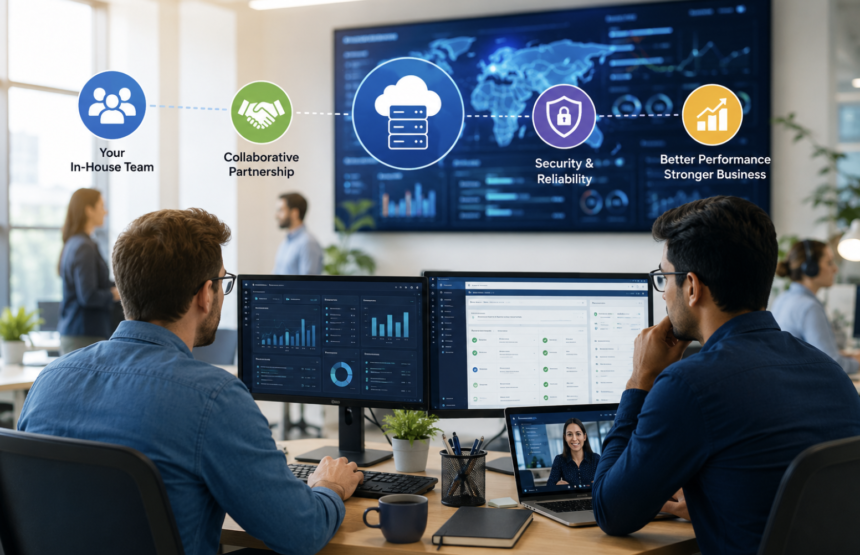
Your IT team does not need to do everything alone. Modern businesses depend on cloud platforms, cybersecurity, remote access, applications, networks, and constant system availability. However, maintaining expertise across every technology area can stretch even experienced teams too far. That is where co-managed IT services can change the equation.
Instead of replacing internal employees, this approach adds outside expertise where it matters most. Your team keeps control of business priorities while an external IT partner fills technical gaps, handles specialized workloads, or provides extra support when demand rises. As a result, businesses can gain stronger IT capabilities without rebuilding their entire technology department.
What Is Co-Managed IT?
Co-managed IT is a shared technology model between an internal IT department and an external IT service provider. Both teams work together while maintaining clearly defined responsibilities. Unlike traditional managed IT, co-managed IT does not require a company to hand over its entire technology environment. Instead, the business chooses which functions require outside assistance.
For example, internal employees might manage users, applications, and business relationships. Meanwhile, an external provider could handle cybersecurity monitoring, cloud administration, backups, or infrastructure management. This flexibility makes the model suitable for organizations with existing IT teams that need additional resources.
How Does Co-Managed IT Work in Practice?
The process usually begins with an assessment of the company’s current IT environment. The business identifies areas where internal resources are limited, overloaded, or missing specialist knowledge. Next, the organization and provider define responsibilities. They establish who handles specific systems, tickets, security alerts, changes, and escalations.
Afterward, both teams connect their workflows and technology tools. Shared documentation becomes especially important because everyone needs access to accurate information.
Communication also plays a major role. Regular meetings help teams review incidents, projects, risks, performance, and upcoming technology changes. Therefore, successful co-managed IT depends on collaboration rather than simply adding another vendor.
Why Companies Are Turning to Co-Managed IT
Technology demands continue to expand. Yet internal IT budgets and staffing levels do not always grow at the same pace. An internal team may understand the company’s operations extremely well. However, that does not mean every employee has deep expertise in cloud security, compliance, networking, automation, or disaster recovery. Hiring a full-time specialist for every discipline can also become expensive.
Co-managed IT provides another option. Businesses can access specialized capabilities without permanently adding every role to their payroll.
Furthermore, companies can scale external support according to their needs. They might require significant assistance during a migration but much less support afterward.
The Biggest Difference Between Co-Managed and Fully Managed IT
The distinction comes down to control and responsibility. A fully managed IT arrangement often transfers most technology operations to an outside provider. The provider may manage infrastructure, support, security, and maintenance on the customer’s behalf.
Co-managed IT takes a different route. The internal team remains actively involved and can retain ownership of important decisions.
For instance, the company might control its technology strategy while the provider manages monitoring and specialized engineering. This structure gives businesses more control while still providing access to external expertise.
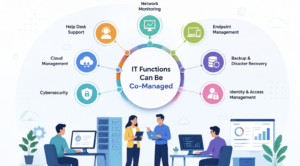
Which IT Functions Can Be Co-Managed?
Almost any IT function can become part of a co-managed arrangement when responsibilities are clearly defined. Common areas include help desk overflow, network monitoring, cloud administration, endpoint management, cybersecurity, backup operations, patching, identity management, and disaster recovery. Some companies also use external experts for Microsoft 365 administration, virtualization, infrastructure automation, compliance preparation, and technology projects.
The right combination depends on the organization’s environment. A business with a strong support team may only need cybersecurity assistance. Another organization might need help with cloud operations and infrastructure monitoring. Consequently, co-managed IT should be designed around actual operational gaps.
Co-Managed IT Can Reduce Pressure on Internal Teams
IT professionals often spend substantial time responding to repetitive operational problems. Routine alerts, patching tasks, monitoring notifications, password issues, and system checks can consume valuable hours. Those responsibilities can prevent internal employees from focusing on larger business initiatives. An external provider can absorb selected operational workloads.
As a result, internal employees may have more time for application improvements, technology planning, automation, employee experience, and strategic projects.
This does not make the internal team less important. Instead, it allows employees to spend more time where their organizational knowledge provides the greatest value.
Cybersecurity Becomes More Practical With Shared Expertise
Cybersecurity is one of the strongest use cases for co-managed IT. Threat detection requires constant attention. However, smaller internal teams may struggle to maintain continuous monitoring while handling everyday IT responsibilities. A security-focused provider can monitor systems, investigate suspicious activity, manage vulnerabilities, and escalate serious incidents.
Meanwhile, internal employees can provide business context during investigations. This combination can make incident response more effective.
External specialists identify and analyze threats, while internal stakeholders understand which systems and operations matter most. Moreover, businesses can strengthen security without completely outsourcing technology ownership.
Cloud Management Is Another Major Opportunity
Cloud platforms create new opportunities but also introduce additional complexity. Organizations may need expertise in cloud architecture, identity management, infrastructure automation, cost optimization, container platforms, and security configurations.
An internal administrator might manage everyday cloud operations successfully while lacking experience with a large migration or complex architecture redesign. A co-managed provider can contribute specialist knowledge during those situations.
For example, a business could bring in cloud engineers during a migration and reduce external involvement after stabilization. This approach provides additional capacity without requiring permanent expansion of the internal department.
How Co-Managed IT Supports Compliance
Compliance requirements can create another challenge for internal IT departments. Organizations may need stronger access controls, audit records, vulnerability management, documented procedures, and security monitoring. External specialists can help identify technical gaps and improve operational processes.
However, responsibility should remain clear. A provider can support technical controls, but business leadership still needs to understand its regulatory obligations.
Shared documentation also becomes important during audits. Teams should know where policies, evidence, logs, access records, and system information are stored. Therefore, co-managed IT can support compliance while keeping accountability visible.
The Importance of Identity and Access Management
Identity management deserves special attention in shared IT environments. Employees, contractors, administrators, applications, and service accounts may all require different access levels.
An external provider can help manage permissions, authentication systems, privileged accounts, and access reviews. However, internal leadership should determine who needs access to sensitive business resources.
A strong model therefore separates technical administration from business authorization. This reduces unnecessary access while making responsibilities easier to audit.
Backup and Disaster Recovery Can Benefit Too
Backups are only useful when organizations can recover from failures. Co-managed IT providers can monitor backup jobs, test recovery processes, identify failures, and help maintain disaster recovery systems.
Regular recovery testing is particularly important. A successful backup notification does not always guarantee that a complete recovery will work.
Internal teams can define which applications require the fastest recovery. External specialists can then help design and maintain the technical process. Together, both teams can build a more dependable recovery strategy.
What Makes a Co-Managed IT Partnership Successful?
Clear ownership should come first. Every major responsibility should have an assigned owner. Teams should know who responds to alerts, approves changes, handles escalations, communicates outages, and updates documentation. Shared tools can also improve collaboration. Using compatible ticketing, monitoring, documentation, and communication platforms reduces information gaps.
Service-level agreements should define expected response times and escalation procedures. Regular performance reviews are equally valuable.
Both sides can examine unresolved issues, recurring incidents, security findings, and upcoming projects. Most importantly, the relationship should feel collaborative rather than transactional.
Common Co-Managed IT Mistakes to Avoid
Poorly designed partnerships can create more confusion instead of reducing it. One common mistake involves unclear responsibility. Two teams may assume the other team owns an important task. Another problem occurs when providers receive excessive administrative access without proper controls.
Disconnected tools can create additional friction. Information may become scattered across separate ticketing and documentation systems. Businesses should also avoid measuring success only by the number of tickets resolved.
A stronger evaluation considers security improvements, system availability, project progress, employee productivity, response times, and technology risk.
How to Choose the Right Co-Managed IT Provider
Choosing a provider requires more than comparing service prices. First, examine its technical capabilities. Look for experience in the technologies your organization actually uses. Next, evaluate its security practices and access controls. The provider may receive significant access to sensitive systems, so trust and governance matter. Communication should also receive attention. Ask how incidents are escalated and how regularly performance is reviewed.
Additionally, examine documentation practices. A strong provider should make knowledge accessible instead of keeping critical information inside its own team.
Finally, confirm that the provider can scale with your organization. The best partnership should solve today’s problems while supporting tomorrow’s technology plans.
What Does Co-Managed IT Cost?
Co-managed IT pricing varies considerably because every arrangement includes different services. A company requiring occasional engineering assistance will have different costs from an organization needing continuous monitoring and security support.
Pricing may depend on users, devices, infrastructure size, service coverage, technical complexity, and required response times. Some providers use fixed monthly pricing. Others charge based on selected services or project requirements.
Instead of choosing solely by price, businesses should compare the expected value against internal hiring, training, technology, and operational costs. The right question is not simply, “How much does the provider cost?” It is, “What business value does the partnership create?”
How Businesses Can Measure Co-Managed IT Success
A successful arrangement should produce measurable improvements. Organizations can track system uptime, incident response times, patch compliance, ticket resolution, backup success, security alerts, and project completion. They can also monitor less obvious improvements.
For example, are internal IT employees spending more time on strategic projects? Are recurring incidents declining? Is the company responding faster to security threats?
These measurements reveal whether the partnership is actually strengthening the IT function. Over time, the data can also help businesses adjust the division of responsibilities.
The Future of Co-Managed IT
The co-managed model is becoming increasingly relevant as technology environments grow more complicated. Businesses now depend on cloud services, automation, artificial intelligence, remote work systems, cybersecurity controls, and increasingly connected applications.
No internal team can reasonably become an expert in every emerging technology. At the same time, companies still need people who understand their unique operations. Co-managed IT bridges those two needs.
It combines internal business knowledge with external technical depth. Furthermore, it allows organizations to expand capabilities without committing to a completely outsourced technology strategy.
Conclusion
Co-managed IT gives businesses another way to build stronger technology operations without surrendering control. The internal team remains close to employees, applications, and business objectives. Meanwhile, external specialists provide additional expertise, capacity, monitoring, and technical support.
When responsibilities are documented clearly, communication remains consistent, and performance is measured regularly, the model can deliver substantial value.
Ultimately, successful co-managed IT is not about deciding which team should control technology. It is about making both teams better together.
FAQ’s
1. What is co-managed IT?
Co-managed IT combines an internal IT team with an external provider for shared technology responsibilities.
2. Is co-managed IT the same as outsourcing?
No, co-managed IT supplements internal employees instead of completely replacing the IT department.
3. Who controls co-managed IT services?
Control depends on the agreement, but internal teams often retain strategic and business-facing authority.
4. Can small businesses use co-managed IT?
Yes, smaller organizations can use co-managed IT to access specialist expertise without hiring multiple specialists.
5. Can co-managed IT improve cybersecurity?
Yes, external security specialists can provide monitoring, detection, vulnerability management, and incident response support.
6. Can co-managed IT support cloud migration?
Yes, external cloud specialists can provide additional engineering capacity during complex migration projects.
7. Does co-managed IT replace internal IT employees?
No, the model typically strengthens existing teams by filling skill and capacity gaps.
8. What should a co-managed IT agreement include?
It should define responsibilities, access permissions, response times, escalation procedures, services, and performance expectations.
9. How is co-managed IT priced?
Pricing depends on the services, users, devices, infrastructure, support coverage, and technical requirements involved.
10. How can businesses measure co-managed IT performance?
Businesses can track uptime, response times, ticket resolution, patch compliance, security outcomes, and project delivery.
11. Is co-managed IT suitable for cybersecurity?
Yes, it can provide specialized security capabilities while internal employees retain business context and decision-making authority.
12. What is the biggest risk of co-managed IT?
Unclear ownership can create confusion, delays, duplicated work, and missed responsibilities.