

Your application can have a powerful CPU and plenty of RAM. Yet, it may still struggle when storage cannot keep pace. A slow drive can quietly create bottlenecks across your entire infrastructure. Database queries may take longer than expected. Websites can become sluggish during traffic spikes. File-heavy applications may also struggle under pressure.
That is why choosing the right storage technology matters more than ever. NVMe SSD vs SATA SSD vs HDD is not simply a speed comparison. Each option offers different advantages for performance, capacity, reliability, and cost.
Moreover, modern high-load projects often generate thousands of storage requests simultaneously. Therefore, the wrong drive can become a serious performance limitation. The right choice, however, can make applications faster and more responsive. So, which storage technology deserves your investment? The answer depends on how your project actually uses storage.
Understanding the Three Main Storage Technologies
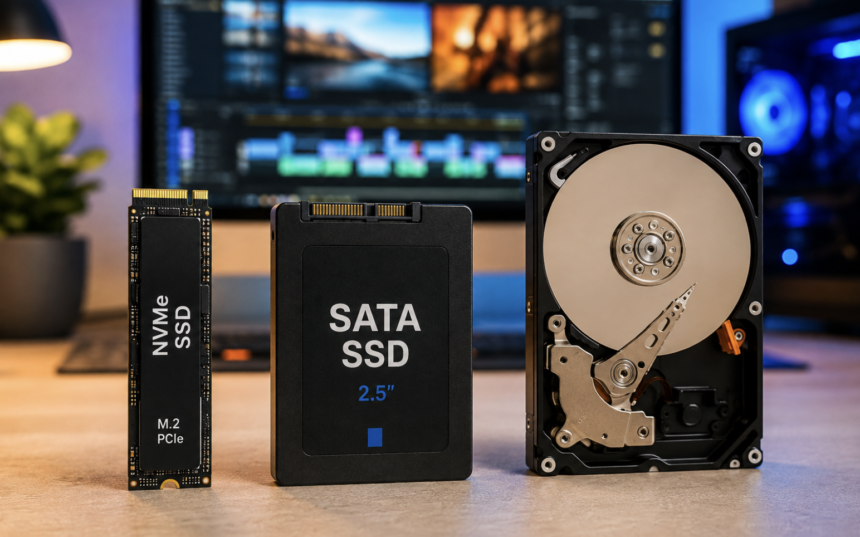
Before comparing performance, it helps to understand how these drives work. Hard disk drives use spinning magnetic platters and mechanical read/write heads. The heads physically move across the platters to locate stored information. Consequently, HDDs have higher latency than modern solid-state storage.
SATA SSDs remove those moving components entirely. They store information using flash memory instead. Therefore, they provide much faster access than traditional HDDs.
NVMe SSDs also use flash memory. However, they communicate through the PCIe interface rather than the older SATA protocol. This design allows them to handle significantly more simultaneous storage operations. As a result, NVMe drives can deliver substantially higher throughput and lower latency.
NVMe SSD Performance: Built for Demanding Workloads
NVMe SSDs are designed for workloads that require rapid data access. They can process many requests concurrently. This capability makes them particularly attractive for high-load applications. Modern NVMe drives can reach several gigabytes per second. However, real-world performance depends on the specific hardware and workload. Latency is another major advantage. Lower latency means applications receive requested data faster. This difference becomes especially important when applications perform frequent random reads and writes.
For example, a busy database may constantly access small pieces of information. NVMe storage can respond to these requests efficiently.
Furthermore, NVMe supports deep command queues and substantial parallelism. These features help storage systems handle many operations simultaneously. That makes NVMe particularly suitable for databases, virtualization, analytics, development environments, and demanding web applications.
SATA SSD: The Practical Middle Ground
SATA SSDs remain useful despite the popularity of NVMe. They offer a major improvement over HDDs without always requiring premium hardware. Their familiar interface also makes them compatible with many existing systems. Typical SATA SSDs can approach the practical limits of the SATA III interface. Sequential speeds often reach around 500–550 MB/s.
However, sequential speed does not tell the entire story. SATA SSDs still provide dramatically lower access latency than mechanical hard drives. They also deliver strong random performance for everyday applications.
Therefore, SATA SSDs can work well for websites, office servers, lightweight databases, application hosting, and general-purpose workloads. They also make sense when budget matters more than maximum performance.
HDD Storage: Slow, Affordable, and Still Relevant
HDD technology may look outdated beside modern SSDs. Nevertheless, hard drives remain valuable for specific storage requirements. Their biggest advantage involves cost per gigabyte. Large HDDs can provide substantial capacity without the higher price associated with SSD storage. Therefore, HDDs remain useful for backups, archives, media libraries, surveillance footage, and other capacity-focused workloads.
However, their mechanical design creates limitations. The spinning platters and moving heads introduce mechanical latency. Random workloads can expose this weakness quickly.
For example, a database performing thousands of small transactions can overwhelm an HDD. The drive may spend significant time seeking different data locations. Consequently, HDDs are usually unsuitable for demanding transactional applications.
NVMe SSD vs SATA SSD vs HDD: The Real Performance Difference
Storage performance involves more than advertised read and write speeds.
- Latency determines how quickly storage responds to individual requests. Lower latency generally helps applications respond faster.
- IOPS measures how many input/output operations a drive can handle. This metric becomes important for databases and other random-access workloads.
- Throughput describes how much data storage can transfer within a given period. Large file transfers benefit heavily from high throughput.
- Queue depth represents how many storage requests can remain outstanding. Modern NVMe drives handle extensive parallel workloads efficiently.
Therefore, you should examine multiple performance metrics before choosing storage. A drive with impressive sequential numbers may still perform poorly under a demanding random workload.
Why High-Load Applications Need Better Storage
High-load applications constantly create storage activity. An online store may process thousands of customer requests. Each request can trigger database reads, writes, logging, and cache activity. Similarly, a content platform may handle thousands of uploaded images and videos. A development server may perform repeated builds and dependency operations.
Meanwhile, analytics platforms can process massive datasets continuously. These workloads create storage pressure. When storage cannot respond quickly, application threads may wait for data.
As a result, CPU utilization may remain lower than expected while users experience slow performance. This situation can make storage bottlenecks difficult to identify. Therefore, monitoring storage latency and IOPS can reveal problems that CPU monitoring misses.
Database Performance and Storage Choices
Databases are among the clearest examples of storage sensitivity. Transactional databases often perform frequent random reads and writes. They also depend heavily on predictable response times. NVMe storage can significantly improve these workloads because it offers low latency and strong parallel performance. SATA SSDs can still provide excellent database performance for moderate workloads. However, heavily concurrent systems may benefit from NVMe.
HDDs generally make more sense for database backups and historical datasets. They are less suitable for active transactional workloads. Additionally, database administrators should consider write endurance.
Constant write activity can place substantial stress on flash storage. Enterprise-grade SSDs often provide stronger endurance than inexpensive consumer models.
Storage Endurance Matters Too
Speed should never become the only selection criterion. SSDs use flash memory cells that have finite write endurance. Manufacturers often specify endurance using a TBW rating. TBW means terabytes written during the drive’s expected service life. A high-write application should therefore use storage designed for sustained workloads.
For example, logging platforms and transactional databases may generate continuous writes. A suitable enterprise SSD can provide greater durability for these environments.
However, consumer SSDs can still perform well for lighter workloads. The important factor is matching endurance specifications with actual workload demands.
Thermal Performance Can Affect NVMe SSDs
NVMe delivers impressive performance, but heat can become a consideration. High-speed PCIe storage can generate substantial thermal output during sustained workloads. When temperatures become excessive, some drives reduce performance to protect themselves. This process is commonly called thermal throttling.
Therefore, cooling matters in high-performance storage environments. Servers should provide appropriate airflow around NVMe devices. Desktop systems may also benefit from dedicated heatsinks. For sustained workloads, consistent performance matters more than short benchmark bursts.
Capacity Planning Is Just as Important
Choosing the fastest drive does not solve every storage problem. Applications also need enough capacity for operating systems, databases, logs, backups, temporary files, and future growth. Running a drive nearly full can also create operational problems.
Therefore, storage planning should include current usage and expected expansion. A project that needs 2 TB today may require considerably more capacity later. Buying storage with no growth margin can force disruptive upgrades. For this reason, capacity should always form part of the initial infrastructure plan.
When NVMe SSD Makes the Most Sense
NVMe is an excellent choice when performance directly affects business results. It works particularly well for high-traffic websites, busy databases, virtualization, container workloads, analytics, and CI/CD systems. It can also benefit applications that perform frequent random operations.
Furthermore, NVMe becomes attractive when multiple users or services access storage simultaneously. However, paying for premium storage makes little sense when the workload rarely uses it. A static website with minimal traffic may not require the fastest available storage.
When SATA SSD Is the Smarter Choice
SATA SSDs provide an excellent balance between cost and performance. They can handle many websites, applications, development environments, and moderate databases comfortably. They also make sense when server hardware has limited PCIe availability.
For businesses upgrading from HDD storage, SATA SSDs can provide a substantial performance improvement without requiring an expensive infrastructure redesign. Therefore, SATA remains a practical option for many general-purpose projects.
When HDD Still Wins
HDDs remain compelling when storage capacity matters more than speed. Backup servers are one common example. Large media archives are another. Organizations may also use HDDs for older datasets that rarely require immediate access.
However, critical active applications should generally avoid relying on HDDs as their primary storage. The lower purchase cost can become less attractive when slow performance affects users and applications.
How to Choose Storage for a High-Load Project
Start by examining your workload instead of choosing based on specifications alone. First, identify whether your application performs sequential or random operations. Next, estimate expected IOPS and storage throughput.
Then, examine latency requirements during peak traffic. You should also consider capacity growth and backup requirements. Afterward, check endurance ratings for SSD-based storage.
Finally, test performance under realistic concurrent workloads. Benchmarking matters because advertised speeds rarely represent every real-world scenario. A storage device that performs well during a short benchmark may behave differently under sustained pressure.
Cost Should Be Measured Beyond the Purchase Price
The cheapest drive is not necessarily the cheapest solution. Slow storage can increase application response times. It can also reduce productivity and create frustrating user experiences. Meanwhile, premium NVMe storage costs more in many environments.
Therefore, businesses should consider the value generated by additional performance. If faster storage improves transaction processing, customer experience, or developer productivity, the investment may quickly become worthwhile.
However, expensive storage provides little value when applications rarely perform demanding operations. The best approach is to calculate performance requirements before spending more.
NVMe SSD vs SATA SSD vs HDD: The Final Verdict
There is no universal storage champion. NVMe SSDs lead when low latency, high IOPS, and massive throughput matter most. SATA SSDs provide an excellent balance between performance, compatibility, and cost. HDDs remain useful when capacity and affordability outweigh speed. Therefore, high-load projects should usually prioritize SSD technology for active workloads. NVMe becomes especially attractive when applications generate heavy concurrent I/O.
However, SATA SSDs can remain perfectly adequate for moderate environments. HDDs still have a strong role in backups, archives, and cold storage. Ultimately, storage should match the workload rather than follow a trend.
A smart infrastructure strategy may even combine all three technologies. NVMe can handle active databases and applications. SATA SSDs can serve general workloads. HDDs can store backups and archives. That layered approach can deliver performance without unnecessary spending.
Frequently Asked Questions
1. Is NVMe faster than SATA SSD?
Yes, NVMe generally provides higher throughput, lower latency, and greater parallelism than SATA SSDs.
2. Is SATA SSD better than HDD?
Yes, SATA SSDs are substantially faster and more responsive than traditional mechanical HDDs.
3. Are HDDs still useful in 2026?
Yes, HDDs remain useful for affordable high-capacity storage, backups, archives, and cold data.
4. Which storage is best for databases?
NVMe SSDs are generally the strongest choice for demanding databases with heavy concurrent read and write activity.
5. Is NVMe worth the extra cost?
NVMe is worth the additional cost when storage performance directly affects application responsiveness or workload completion.
6. Can an SSD improve website performance?
Yes, faster storage can reduce storage-related delays and improve database and application response times.
7. Does NVMe use less power than HDDs?
NVMe SSDs can use less energy for many workloads because they avoid mechanical components and finish operations faster.
8. What does SSD endurance mean?
SSD endurance describes how much data a drive can reliably write during its expected operating life.
9. Should I use HDD for backups?
Yes, HDDs can provide economical large-capacity backup storage when rapid access is not the primary requirement.
10. Can NVMe overheat?
Yes, sustained high-performance workloads can generate heat, so adequate cooling can help maintain consistent performance.
11. Which storage is best for virtualization?
NVMe usually works best for heavily loaded virtualization environments because it handles concurrent storage operations efficiently.
12. Should I choose storage based only on speed?
No, you should also consider latency, IOPS, endurance, capacity, reliability, workload patterns, and total cost.