

Google has introduced a helpful new feature called Transit Mode for Google Pixel devices as part of the March 2026 Feature Drop. The update focuses on improving daily travel by offering smarter notifications and personalized settings designed specifically for commuters.
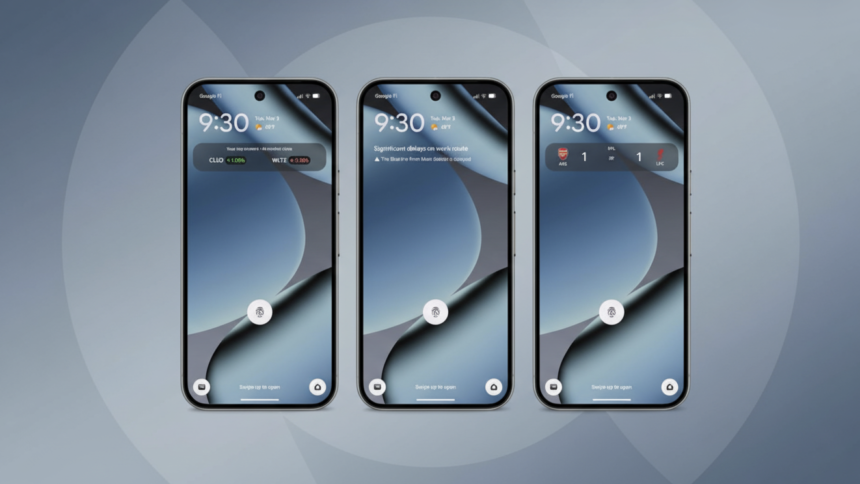
Alongside this feature, Google has also upgraded its At a Glance widget to deliver real-time transit updates directly on the lock screen and home screen.
Real Time Commute Updates on Pixel Phones
The enhanced At a Glance widget can now show live updates about traffic and public transportation delays. This means Pixel users can quickly check travel conditions without opening additional apps.
For example, you may see alerts like:
-
“Significant delays on your work route.”
-
“Blue Line from Main Station is delayed.”
These alerts expand on the existing commute information system that already displays traffic conditions and estimated travel times. The new system pulls data from Google Maps to provide more accurate and timely updates.
What Is Transit Mode on Pixel Phones?
Transit Mode is a personalized device setting that automatically adjusts your phone’s behavior while you are traveling by public transport, such as trains or buses.
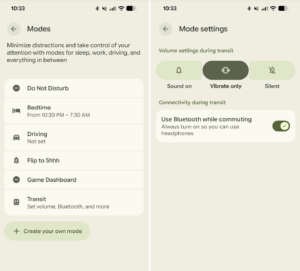
It is part of the broader Modes feature, which also includes options like Driving Mode and Do Not Disturb. When activated, Transit Mode helps minimize distractions while still allowing important notifications to come through.
Users can customize several settings, including:
-
Sound controls: Choose between Sound On, Vibrate Only, or Silent.
-
Bluetooth settings: Enable or disable Bluetooth while commuting.
-
Notification permissions: Allow all notifications or limit them.
-
People notifications: Select which contacts can send alerts.
-
App notifications: Choose which apps are allowed to notify you.
-
Alarms and interruptions: Decide which alerts can bypass restrictions.
These options help create a focused and distraction free commute experience while ensuring you don’t miss essential updates.
How to Set Up Transit Mode on Pixel Phones
Setting up Transit Mode is simple and only takes a few minutes. Follow these steps:
-
Open Settings on your Pixel device.
-
Tap Modes.
-
Select Transit Mode.
-
Go to App Settings.
-
Tap Set Up Commute Notifications.
During the setup process, you will need to:
-
Add your home and work locations
-
Confirm your location settings
-
Create a commute profile
Once completed, your phone will begin learning your travel patterns to provide personalized notifications.
Why Google Maps Needs Time to Learn Your Commute
According to Google’s support documentation, it may take two to three weeks before commute alerts appear consistently.
This is because the system relies on data from your Maps Timeline, a feature inside Google Maps that tracks your travel history. Over time, the system analyzes your movement patterns and identifies your regular routes between home and work.
As the system gathers more data, the At a Glance widget becomes smarter and more accurate in predicting delays or transit changes.
Device Compatibility and Availability
The real time transit feature in At a Glance is currently available on Pixel 7 and newer devices. However, it does not support the Pixel Tablet.
Additional availability details include:
-
Works globally but is not available in Europe or the UK
-
Requires a Google account connection
-
Requires the Google Maps app
-
Some language restrictions may apply
A Smarter Commute for Pixel Users
With Transit Mode and improved real time travel alerts, Google Pixel devices are becoming smarter companions for everyday commuting. By combining customizable device settings with live transit data, Google aims to make daily travel smoother and less stressful.
For people who rely on trains, buses, or other public transportation, this feature can help reduce distractions and keep important travel information front and center.