

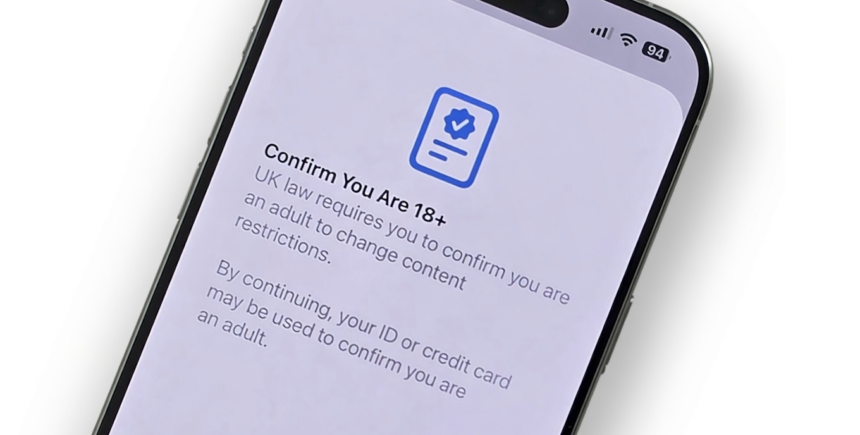
Apple has released iOS 26.4 with a list of new features, from Apple Music tweaks to accessibility upgrades. But one of the most important updates for people in the UK arrived quietly, a built-in age verification step that helps confirm whether a user is 18 or older.
This change matters because the UK’s Online Safety Act is reshaping how platforms handle adult content and age-restricted experiences. Apple’s move also signals a larger shift, age assurance is no longer just an app by app responsibility. It’s becoming part of the device and account ecosystem.
In this article, you’ll learn what Apple’s UK age verification in iOS 26.4 does, why Ofcom welcomed it, how the process works in real life, and what practical steps you can take if you manage devices for children or teens.
What’s New in iOS 26.4 (And What Apple Didn’t Highlight)
Apple publicly promoted iOS 26.4 as a feature packed update. The company spotlighted improvements to everyday services like music, device usability, and accessibility.
However, UK users noticed a significant change that wasn’t front and center in Apple’s official highlights: a new age verification flow designed to confirm adult status for access to age-restricted content and apps.
This feature first appeared earlier in a developer beta build, then disappeared after Apple indicated it wasn’t meant to be included yet. With the full iOS 26.4 release, it is now live for UK users.
Quick snapshot of what the UK update affects
- Age-restricted App Store experiences (such as apps intended for 18+ audiences)
- Access to content where adult verification is needed for unrestricted viewing
- How Apple accounts may be used to confirm eligibility without uploading documents in some cases
Britain’s Online Safety Act: Why Age Verification Is Becoming Standard
The UK’s Online Safety Act places legal responsibilities on online services to protect children and reduce exposure to harmful content. A key requirement is that platforms must prevent underage users from accessing content intended for adults unless reliable age checks are in place.
That creates a real-world challenge for tech companies:
- Apps and websites need to know if a user is a child or an adult.
- “Click-to-confirm” age gates are no longer considered strong enough in many cases.
- Regulators expect more meaningful age assurance methods.
Because Apple distributes apps and manages account-level access through iOS, it sits in a powerful position to support age assurance at the operating system level especially for UK users.
Why Apple’s approach matters
When age verification happens at the device/account layer, it can reduce friction across multiple apps. Instead of repeating checks in every individual service, a verified adult status can streamline access while still meeting regulatory expectations.
Ofcom’s Response: Why the UK Regulator Praised Apple
Ofcom (the UK Office of Communications) oversees a wide range of services including broadcast, telecoms, and online platforms. Under the Online Safety Act, Ofcom plays a major role in shaping enforcement expectations and practical compliance.
Following iOS 26.4’s release, Ofcom publicly welcomed Apple’s decision to launch age verification and child safety protections in the UK early.
What Ofcom’s praise signals
Ofcom’s positive reaction is important for two reasons:
- It suggests Apple’s implementation aligns with the regulator’s direction on age assurance.
- It reinforces that the UK is becoming a priority market for child-safety product changes.
Ofcom also emphasized flexibility and innovation, indicating it wants companies to use different approaches to age assurance as long as they are effective at protecting users especially minors.
How Apple’s UK Age Verification Works in iOS 26.4
Apple’s new UK age verification aims to confirm whether the user is 18+ so they can access adult-rated apps and unrestricted content.
In practice, Apple may be able to verify adulthood automatically for some users. For example, long-standing account history can contribute to confidence that a user is an adult.
A real-world user experience (what it feels like)
Many users prefer verification methods that do not require uploading sensitive documents. Apple’s system can feel fast and low-friction when it confirms age automatically.
A typical experience looks like this:
- You receive a prompt related to age-restricted access
- iOS attempts to confirm whether you are 18+ using signals tied to your Apple account
- If successful, you get a confirmation message and can continue
This is especially convenient for people who have used Apple services for many years and have consistent account activity.
What if iOS can’t verify you automatically?
If the device can’t confirm your age through account based signals, Apple may require an additional step. The exact method can vary depending on how Apple implements “age assurance” over time, but the goal stays the same: confirm adult status in a way that meets UK requirements.
Why This Is a Big Deal for Families (Not Just App Downloads)
Age verification isn’t only about accessing adult apps. It connects to a broader safety conversation: how children encounter harmful content across devices, platforms, and browsers.
For parents and guardians, OS-level changes can be valuable because they:
- Work across multiple apps rather than relying on one company’s settings
- Reduce loopholes where a child switches apps to avoid restrictions
- Encourage stronger defaults for younger users
Practical tips for parents and guardians in the UK
If you manage a child’s iPhone or iPad, consider these actions alongside the new iOS 26.4 changes:
- Review Screen Time settings and content restrictions
- Confirm the child’s Apple ID birthdate is accurate (avoid “aging up” accounts)
- Use Family Sharing to manage purchases and downloads
- Check app age ratings before approving new installs
These steps don’t replace age assurance, but they strengthen protection and reduce accidental exposure.
What This Update Means for Developers and App Publishers
For developers, Apple’s age verification feature could change how age-gated content is handled in UK iOS apps.
If Apple provides a reliable system-level signal for adulthood, developers may:
- Reduce repeated in-app age prompts
- Improve onboarding conversion by removing friction
- Strengthen compliance for UK-specific rules
At the same time, developers will still need to follow platform rules, local law, and their own content responsibilities. Apple’s verification doesn’t automatically solve every compliance requirement, but it can become an important building block.
A likely future trend
More countries are exploring stronger child safety regulations. If Apple’s UK rollout proves effective, similar age verification flows could expand to other regions especially where regulators push for standardized age assurance.
Benefits and Trade-Offs: The Practical Reality of Age Verification
Age verification can improve safety, but it also raises valid concerns around privacy, ease of use, and errors.
Potential benefits
- Helps keep minors away from adult content
- Makes age-restricted access more consistent
- Encourages safer defaults for families
- Reduces pressure on individual apps to invent their own age-check systems
Potential trade-offs
- Some adults may be incorrectly flagged and need extra steps
- Users may worry about how age is determined
- Any verification system must balance safety with data minimization
The best implementations are the ones that confirm eligibility without collecting more personal information than necessary.
Conclusion: iOS 26.4 Age Verification in the UK Marks a New Era for Online Safety
Apple’s iOS 26.4 update is more than a routine feature refresh for UK users. By introducing age verification for access to 18+ experiences, Apple is responding directly to the UK’s Online Safety Act and pushing age assurance closer to the operating system level.
Ofcom’s welcome is a strong sign that regulators want practical, innovation friendly solutions that protect young people without creating unnecessary friction for adults. For everyday users, the biggest takeaway is simple: age checks on major platforms are becoming normal, and device-level verification may soon be part of the standard digital experience.
If you’re in the UK, updating to iOS 26.4 isn’t just about new features, it’s about how your device proves who can safely access what, and how quickly the online safety landscape is changing.